How Web Scraping Is Used To Extract Movie Details From YIFY Movies?
Web Scraping
Web scraping is a technique for extracting information (or simply data) from websites using a range of tools and techniques.
There are numerous websites that contain different kinds of data that can be extremely beneficial in terms of day-to-day necessities, scientific work, industry use, businesses, and so on.
Stock prices, product information, sports statistics, weather reports, movie ratings, and so on.
YIFY Movies:
- YIFY Movies Is A Website That Provides Free Movie Torrent Connections And Has A Large Database Of Movies And Documentaries.
- For Our Project, We Would Like To Extract Movie Information (Such As Title, Year, Genre, Rating, Movie Link, Synopsis, And Number Of Times Downloaded).
Tools
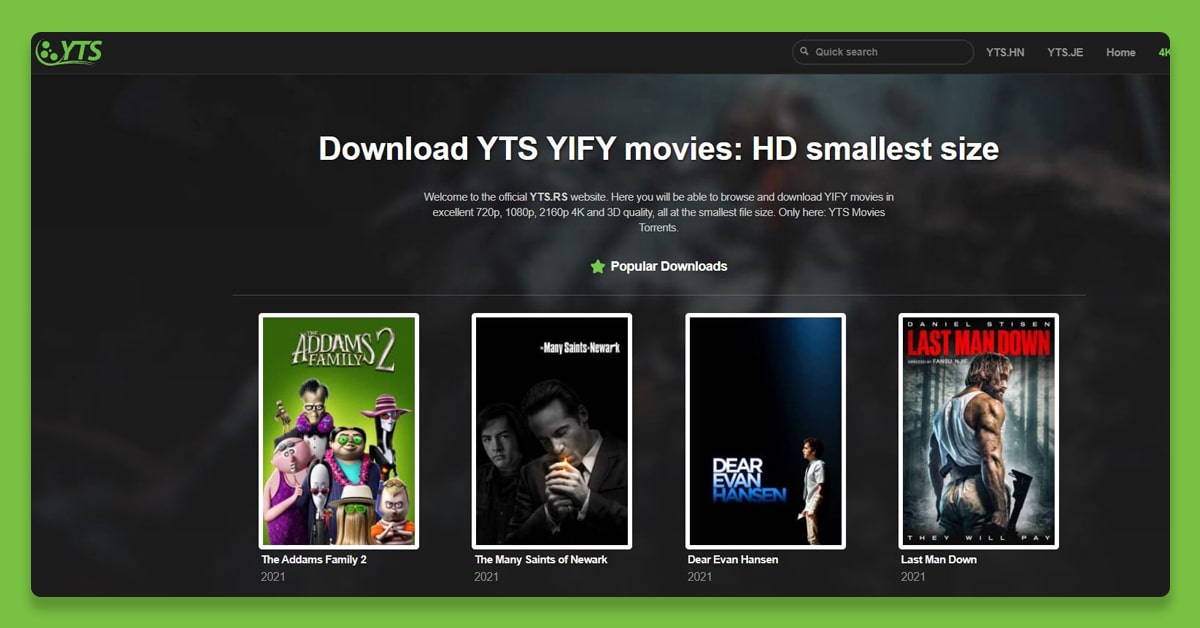
YIFY Movies is a website that provides free movie torrent download links and has a massive database of movies and television shows.
For our project, we'd like to extract movie information (such as title, year, genre, rating, movie link, synopsis, and number of downloads).
Outline
Here is a summary of the steps that you will need to follow:
- Using The Queries, Download The Webpage.
- Beautiful Soup Is Used To Parse The HTML Source Code.
- <Tags> Usually Contains Information For Movie Title, Year, Genre, Rating, Movie-Url, Synopsis, And Number Of Downloads Are Being Searched.
- Scrape Information From Multiple Pages (In Our Case, 20) And Publish It Into Python Lists And Dictionaries.
- Save The Features Extracted As A CSV File.
By the end of our project, we would have a CSV file in the following format:
Movie,Year,Genre,Ratings,Url,Synopsis,Downloaded
Whale Hunting,1984,Drama,6.5 / 10,https://yts.rs/movie/whale-hunting-1984," A disillusioned student meets a eccentric beggar and a mute prostitute he falls in love with. Together, without money, they cross South Korea to help the girl go home. "," Downloaded 101 times Sep 27, 2021 at 09:08 PM
........
Download the Webpage using Requests
The requests library will be used to install the website and start creating a bs4 doc' object. Pip can be used to install the library.
def get_doc(url):
    """Download a web page and return a beautiful soup doc"""
    # Download the page
    response = requests.get(url)
    # Check if download was successful
    if response.status_code != 200:
        raise Exception('Failed to load page {}'.format(url))
    # Create a bs4 doc
    doc = BeautifulSoup(response.text, 'html.parser')
    return doc
doc = get_doc(site_url)
doc.find('title')
<title>Search and Browse YIFY Movies Torrent Downloads - YTS</title>
The get_doc() function will develop a BeautifulSoup doc using the doc.find(‘title’) function we get the title tag from the html source code.
Searching <tags> Containing Movie Data
We'll look at the <tags> in the source code to find and get the following information:
- Movie
- Year
- Genre
- Rating
- URL
- Synopsis
- Downloads
Extracting the Movie Titles from Web Page
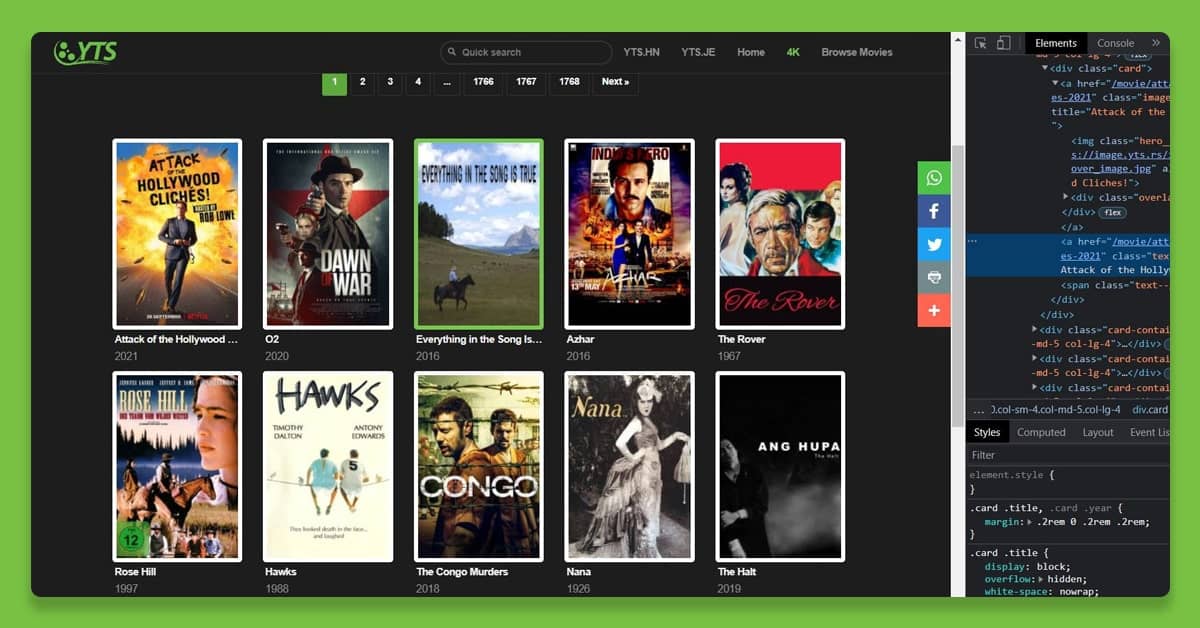
Before we continue, right-click on the web page where you will see the movie's title and inspect. As seen in the image, the <a> tag contains the title of the movie. This will apply to all of the movies on the page.
def get_movie_titles(doc):
    # get all the <a> tags with a unique class
    movie_title_tags = doc.find_all('a', class_ ='text--bold palewhite title')
    # create an empty list
    movie_titles = []
    for tag in movie_title_tags:
    # for 'title' in each <tag7gt; append it to the list
        movie_titles.append(tag.text)
    # return list
    return movie_titles
The get_movie_titles() function successfully returns a list of movie tiltes.
Extract Movie Years from the Web Page
def get_movie_years(doc):
    # get all the <sapn7gt; tags with a unique class
    movie_year_tags = doc.find_all('span', class_ = 'text--gray year')
    # create an empty list
    movie_years =[]
    for tag in movie_year_tags:
    # for year in each <tag7gt; append it to the list.
        movie_years.append(tag.text)
    return movie_years
The get_movie_years() sucessfully returns a list of movie years
Extract Movie Genres from Web Page
def get_movie_genres(doc):
    # get all the <h4> tags with unique a class
    genre_tags = doc.find_all('h4', class_ = 'genre')
    # create an empty list
    movie_genres = []
    for tag in genre_tags:
    # for genre in each <tag> append it to the list.
        movie_genres.append(tag.text)
    return movie_genres
The get_movie_genres() function successfully retunrs a list of movie genres.
Extract Movie Ratings from Web Page
def get_movie_ratings(doc):
    # get all the <h4> tags with a unique class
    rating_tags= doc.find_all('h4', class_ = 'rating')
    # create an empty list
    movie_ratings = []
    for tag in rating_tags:
    # for rating in each  append it to the list.
        movie_ratings.append(tag.text)
    return movie_ratings
The get_movie_ratings() function successfuly returns a list of movie ratings.
Extract Movie URLs from the Web Page
def get_movie_urls(doc):
    # get all the <a> tags with a unique class
    movie_url_tags = doc.find_all('a', class_ ='text--bold palewhite title')
    # create an empty list
    movie_urls = []
    # the base url for the website
    base_url = 'https://yts.rs'
    for tag in movie_url_tags:
    # for url in each tag, append it to the list after adding the base_url with url from each tag
        movie_urls.append(base_url + tag['href'])
    return movie_urls
The get_movie_urls() function successfully returns a list of movie urls.
Similarily, we define functions get_synopsis and get_downloaded to get a list of movie synopsis and number of downloads information.
Extract Movie Synopsis from Web Page
def get_synopsis(doc):
    # create an empty list
    synopses =[]
    # get all the movie urls from the page
    urls = get_movie_urls(doc)
    for url in urls:
        # for each url (page) get the beautiful soup doc object
        movie_doc = get_doc(url)
        # get all the  tags with a unique class
        div_tag = movie_doc.find_all('div', class_ = 'synopsis col-sm-10 col-md-13 col-lg-12')
        # get all the  tags inside the first  tag
        p_tags = div_tag[0].find_all('p')
        # the text (i,e the synopsis) part from the  tag is extracted using .text feature
        synopsis = p_tags[0].text
        # the synopsis is appended to the list synopses
        synopses.append(synopsis)
    return synopses
The get_synopsis() function gets a list of synopsis for every movie of a web page and returns it.
Extract the Movie Downloads from the Web Page
def get_downloaded(doc):
    # create an empty list
    downloadeds = []
    # get all the movie urls on page
    urls = get_movie_urls(doc)
    for url in urls:
        # for each url(page) create a beautiful soup doc object
        movie_doc = get_doc(url)
        # get all the <div> tags with unique class
        div_tag = movie_doc.find_all('div', class_ = 'synopsis col-sm-10 col-md-13 col-lg-12')
        # get all the <p> tags inside the first <div> tag
        p_tags = div_tag[0].find_all('p')
        # get all the <em> tags inside the second <p> tag
        em_tag = p_tags[1].find_all('em')
        # extarct the text from the <em> tag using .text
        download = em_tag[0].text
        # using reular expressions to strip of alphabets from the text using .compile()
        regex = re.compile('[^0-9]')
        downloaded = regex.sub('',download)
        # append the integer to the list downloadeds
        downloadeds.append(downloaded)
    return downloadeds
The get_downloaded() function retrieves and returns a list of download counts for each movie on a web page. To match and extract our string, we used the re (regular expression operations) functions.
Extract Movie Details for a URL (page)
def scrap_page(url):
    # get beautiful soup doc object for url
    doc = get_doc(url)
    # create 7 empty lists for each field
    movies,years,genres,ratings,urls,synopses,downloadeds=[],[],[],[],[],[],[]

    # get list of movie titles
    movies = get_movie_titles(doc)
    # get list of years
    years = get_movie_years(doc)
    # get list of genres
    genres = get_movie_genres(doc)
    # get list of ratings
    ratings = get_movie_ratings(doc)
    # get list of urls
    urls = get_movie_urls(doc)
    # get list of synopsis
    synopses = get_synopsis(doc)
    # get list of downloads
    downloadeds = get_downloaded(doc)

    return movies,years,genres,ratings,urls,synopses,downloadeds
The scrap_page() function effectively reverts a list of movies, years, genres, ratings, urls, synopses, and downloads for a new website whose url is passed as an argument to the scrape_page(url)' function.
Extract Movie Details for the Entire Website
def website_scrap():
    # create 7 empty list for each field to append the corrsponding field list being returned
    all_movies,all_years,all_genres,all_ratings,all_urls,all_synopses,all_downloadeds = [],[],[],[],[],[],[]
    for i in range(1,21):
        url = 'https://yts.rs/browse-movies?page={}'.format(i)
        # get lists of movie filed details and append them to the final list
        movies,years,genres,ratings,urls,synopses,downloadeds = scrap_page(url)
        all_movies += movies
        all_years += years
        all_genres += genres
        all_ratings += ratings
        all_urls += urls
        all_synopses += synopses
        all_downloadeds += downloadeds

    # create a dictionary from the final list attained for each 'key' as movie detail
    movies_dict = {
        'Movie': all_movies,
        'Year': all_years,
        'Genre': all_genres,
        'Rating': all_ratings,
        'Url': all_urls,
        'Synopsis': all_synopses,
        'Downloads': all_downloadeds
    }
The above website_scrap() function is the primary function from which all other defined functions are executed.
It collects a list of details (movies, years, genres, ratings, urls, synopses, and downloadeds) from various pages and adds them to a relating larger list (all_movies, all_years, all_genres, all_ratings, all_urls, all_synopses, and all_downloads). Finally, a vocabulary movie_dict is created, with the larger lists serving as 'values' for the dictionary'Keys'.
Create a Pandas DataFrame using the Dictionary movies_dict
movies_df = pd.DataFrame(movies_dict, index = None)
return movies_df
| No | Movie | Year | Genre | Rating | Url | Synopsis | Downloads |
|---|---|---|---|---|---|---|---|
| 0 | The Rise of the Synths | 2019 | DocumentaryMusic | 7.1 / 10 | https://yts.rs/movie/the-rise-of-the-synths-2019 | Raise your hand if you haven't seen or heard | 0 |
| 1 | Vengeance | 1968 | Western | 6.2 / 10 | https://yts.rs/movie/vengeance-1968 | A man tracks down the five outlaws who murder | 1111 |
| 2 | King | 1978 | BiographyDrama | 8 / 10 | https://yts.rs/movie/king-1978 | The story of Dr. Martin Luther King Jr., stre... | 1212 |
| 3 | Once Upon a Time at Christmas | 2017 | Horror | 3.4 / 10 | https://yts.rs/movie/once-upon-a-time-at-chris... | When a serial-killer couple dressed as Santa | 1515 |
| 4 | The Rolling Stones: Sweet Summer Sun - Hyde Pa... | 2013 | DocumentaryMusic | 8.1 / 10 | https://yts.rs/movie/the-rolling-stones-sweet-... | The Rolling Stones historic and triumphant re... | 1313 |
| .... | .... | .... | .... | .... | .... | .... | .... |
| 396 | Potato Salad | 2015 | ComedyHorror | 1.3 / 10 | https://yts.rs/movie/potato-salad-2015 | When a deadly zombie virus infects a school i... | 3232 |
| 397 | 15 Years and One Day | 2013 | Drama | 5.9 / 10 | https://yts.rs/movie/15-years-and-one-day-2013 | Margo is struggling to deal with her son, Jon... | 3838 |
| 398 | Elisa's Day | 2021 | CrimeDrama | 5.4 / 10 | https://yts.rs/movie/elisas-day-2021 | It's a tragic case of history repeating as tw... | 5151 |
Converting and Saving the DataFrame data type (above output) to a csv file
movies_df.to_csv('movies_data.csv')
# Converts the Dataframe object 'movies_df' to a csv file and saves it in .csv format
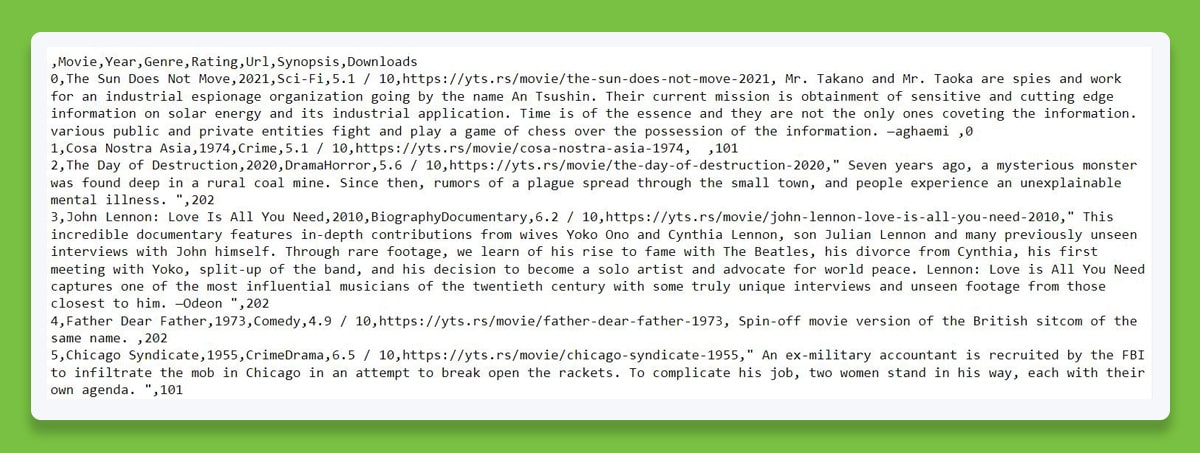
When Opened in Notepad, the Contents of the.csv File Would Look like This.
Conclusion
- So Far, And Here Is What We've Accomplished With Our Project:
- Using Requests.Get() And The Web Page's URL, I Downloaded A Web Page.
- BeautifulSoup Was Used To Parse The HTML Source Script Of The Site And Create An Item Doc Of Category Beautiful Soup.
- A Function Was Defined To Generate A Doc Object For Each URL Page.
- Defined Functions To Extract Movie Details From Each Page, Such As Movies, Years, Genres, Ratings, URLs, Synopses, And Downloaded.
- Python Lists And Dictionaries Were Created From The Extracted Data.
- You Can Create A Pandas Data Frame Project To Display The Extracted Information In Tabular Form.
- The Data Frame Was Converted And Saved As A.Csv File.
If you are looking to scrape the movie details from YIFY Movies, contact iWeb Scraping today.
.jpg)
.jpg)

Comments
Post a Comment